All Google Products at a Glance on Google New

Google has put all the products under one umbrella that is Google New. You can easily get information about any Google products on new website called Google New which is also published by Google. All the products at a glance get information on new development area for any product, we are using only few products orkut, Google Map, adwords, Google Adsense but here in Google New website so many more are displayed which we never see. More than 50 products have developed by Google and you can view new development feature of Google products form Google New website.

Google New is introduced to track record for all products and declare to people about new features in the products. It will take few minutes to know coming up new features in the product .Users are always keen to hear from Google what are new things coming now for this product so Google is published information about all Google products which are under development with any new features or extended features or products are ready for launching in the global market world wide. As you click on Google Product you will get detailed information about the product and you will find what development has done for extending feature and which product is going to launch in future with a new features. Everyone wanted to know about all Google products and developed feature. For an example Google TV is a new product which are going to launch word wide next year so information about this product available on this website.

The look and feel of Google new is very good and very attractive to the visitors,easy to navigate and easy to find the any product through the pagination.
To look on all Google products at a glance, click here http://www.google.com/newproducts/

Earn Money By Google Affiliate Network

Google Affiliate Network has come now with excellent concept of another way of earning money apart from Google Adsense, this program is fully come for publisher or Advertiser again, This is an another gift to publisher and Advertiser. Job is for publisher or advertiser or affiliate to sell the product for Google associated companies or Google Adwords Network. I would say in short it might be easy job than Google Adsense if you have a good running website with few visitors only then you can start this small business of selling product online, if someone click on advertisement which runs by Google Affiliate Network and buying the same product through your referral or website then your account will be credited with the commission in Google Adsense account, the payment method is approximate same as it is in Google Adsense, you will get the payment as it complete the Payment threshold of 100 $.

If you have an Adsense account, however you will have to apply for Google affiliate Network too. Google will approve your application after looking or reviewing your website in detail for a verification . After an approval mail, only you would able to show advertisement on your website . Once website is running with advertisement from Google Network and if anyone clicks on a particular ad and purchase the product then you will be getting credited with a particular commission in your Google Adsense Account . Google has so many associated group of companies and huge network of companies . You can earn easily by this method if you have good website and visitors are coming to your website .

How you receive commission from Google Affiliate Network ?
When any sale product or items is sold through your website then you will get commission and money will go in your Adsense account .

Can I have both account together Google Adsense and Google Affiliate Network ?
Yes, You can display both advertisement from Google Adsense Network and Google Affiliate Network .

If I do not have Adsense account , then Can I earn money from Google affiliate Network ?
Yes, You have to apply for Google affiliate Network account from sign up link .

How to Sign up in Google Affiliate Network ?
http://www.google.com/ads/affiliatenetwork/

Before signup you just go with online help center
http://www.google.com/support/affiliatenetwork/

You can ask your questions on online help forum
http://www.google.com/support/forum/p/affiliatenetwork?hl=en

Real Time Search from Twitter, Google Buzz, Friend Feed, Face Book, Digg

Google has developed a new separate search engine to search from the twitter, Google buzz, friend feed, Facebook and many more sources . It is very good step taken by Google and Google is ahead from all . If you take a look of real time search engine then you will see that you are getting updates as soon as of new information and updates as twits on twitter and buzzes from Google buzz from Gmail any time . We would say this is a special gift given to all twitter users and Gmail users for buzzing articles and updates and it’s an advertisement of their business directly automatic from Real time search engine, it is moreover same like Google search engine, only difference is it gets result from twitter, Google buzz, friend feed, Facebook and Digg . It also takes pages from website and blogs if any new post or article at the same time as you posted and it sets for your real time search engine .

Real time search engine is focused and emphasized on providing you latest information as it posted or written in websites or in any blog. In real time search you can search according your location and current time, you can customize your time and location, according the time and location you will get the result in result set.

You can get latest information for past 24 hours, Past week, Past month, Past Year. It has been easy to search videos, blogs, and shopping items as per current time and latest updated on the website . It is fetching videos from Youtube.com, Break.com, metacafe.com, stupidvideos.com, google.com, vidiojug.com.

You can also make your search duration based in Short (0-4 min), Medium (4-20 min), and Long (20 + min) times. Last but not least In more, you will able to search also latest news, latest book, latest updates, latest discussion, also it search the business locations from Google Maps, you can get address of any shop or any industry very easily.

To enjoy this new introduced feature just click here www.google.com/realtime

Note - Real Time Search is shut down by Google on July 2, 2011 when deal got expired with twitter.

Google Instant Search and Google Chrome With 4 Search Engine

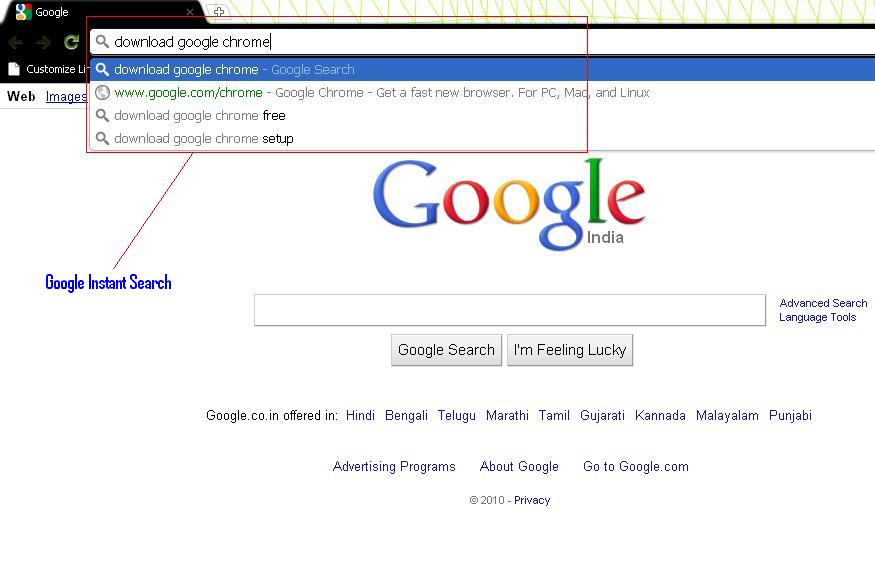
The new feature has been developed by Google recently, they have implemented instant search in Google chrome browser as it was working before while we are searching in www.google.com.

Now there is no need to open Google.com and we can directly search in Google chrome and it will fetch result data directly from search engines instantly at the moment as you type search string in the browser, no need to click on search button, you will get search result in seconds . New feature also gets search string list from browser history too.As you change your typing , the result set changes accordingly.New Google Chrome browser has launched now and you can download easily from below link –
Asking to choose search Engine while doing setup Google Chrome -
When you do setup of Google chrome it will prompt you with choosing search engine, you can choose any search engine from 4 search engine Google, Yahoo, Bing, Ask Search. I had chosen my favorite Google.


Google Instant Search –
Searching in a Google chrome also become a faster, Google made it faster by 2.5 seconds. For Example if any search was taking 7 seconds for fetching data from Search Engine or Google bot, now it will take only 5.5 seconds .It will make little affect on Page Rank, web traffic and SEO too.Google has just launched google instant search on www.google.com and for Google India ( www.google.co.in ) both.


Before Google Chrome Browser, we had the same instant search while doing search in www.Google.com. Look at below Image.  


Change theme of Google Chrome Browser –
You can change also theme of Google Chrome browser any time, it is easy to do, just click on below link and say apply theme and theme will apply in seconds for your Google chrome browser.

https://tools.google.com/chrome/intl/en/themes/index.html

Replicating same idea so many people -
So many people have started to create the same idea for getting videos as you type and get job list as you type.So many new websites introduced which are implementing the same idea in their websites or blogs.

Take A Look of Google Translator for English Dictionary

A very exciting features developed by Google, we have seen earlier that we were using Google translator for converting one language to other language, Recently Google has provided a additional feature that how to  pronounce any language using Listen Icon on the both side for your both selected languages .

Suppose I want to learn German and know only English then through the Google translator tool you can learn German easily and quickly . We would say this is good dictionary and nice tool which is available for all the languages and you can make good command on any language by using Google translator Tool . You can speak any world language using this tool . I am taking an example of two languages Hindi and English , if you want to speak English and you know only how to speak in Hindi or I would say you are perfect in your country language then type the word in Hindi or in your language in the Google Translator tool and see the exact meaning of this at right side in a English Language or in other language as you want .

  • Translated by Google Translator : English to Hindi :

Google Translator : English to Hindi 


In above Image you are looking that meaning of Onerous in Hindi, you can choose any language to see the meaning of Onerous word as shown above .When you click on left side Listen Icon then it will pronounce the first language English as per above example, and when you click on the right side Listen Icon it will pronounce the other language . Now I am taking another example if we want to check vice versa then see below example .

  • Translated by Google Translator : Hindi to English :-

Google Translator : Hindi to English


In Image 2 , I given word Duvidha its written in Hindi language at the left side and when I translate in to English , I see Dilemma the correct word which will be using for Duvidha in hindi, also we are seeing few more nouns which can be used in place of Dilemma , more than this it's also tells usage of Dilemma                     word if you click on  right side on link given view detailed dictionary .

Really an amazing feature developed by Google, we all should appreciate Google for making our life easier .
To get Google translator Tool , just Type www.google.com in browser and when you select down arrow on more, you will get first options as a Translate .