Get Running Train Status, Arrival Status, Departure Status, Delay Time & PNR Status

Train Running Status, Arrivals, Departures, PNR, Cancelled Trains List

Get Status of Current Running Train, Delay Time and Arrival Status by Train Name or Number using Trains Tab:
Enter the Train Name or Train Number in search box and get the status of a running Train.

Get List of Trains Arriving and Departures At Station by Station Name using Stations Tab :
Provide Station Code or Station Name and get the list of trains arriving trains at this station in next 2 hours and 4 hours.You may get status of Delay Time as well as by selecting a particular train.


Get List of Trains Between One Station to Other Station by  Station Codes using Stations Tab :
Provide a Code of two stations.For an example enter in search NDLS to LKO, Pune to Goa.

Get List of Current Special Trains :
Special trains are running due to some reason and valid for specific date ranges.Select train and get the information about the train.
http://trainenquiry.com/liveupdates/SpecialTrains.aspx

Get List of Cancelled Trains :
Get list of cancelled trains for the day.
http://trainenquiry.com/TrainException/ExceptionalTrains.aspx

Get Seat / Berth / PNR  Status :
Enter your 10 Digit PNR number which is written on your ticket and get the current status of your seat / berth.
http://www.indianrail.gov.in/pnr_Enq.html

Get Railway Station Code :
To get the Railway station type initial 3-4 character of any station.

Do any Complain or Track your Complain :
http://customercare.indianrailways.gov.in/criscm/home.seam

Use Rail Radar to visualize All Running Trains
http://www.makemyvision.com/2012/10/rail-radar-all-indian-trains-running-on.html


                                                           Use SMS Service


Locate Running Train Status by Sending SMS :

Type SPOT 12533 and send it to 139 where 12533 is a train number.Type your Train Number.

Type LOCATE 12533 and send it to 139 where 12533 is a train number.Type Your Train Number.

Get Seat / Berth / PNR  Status by sending SMS :

Type PNR number 10 digits and send it to 139.

Get Arrival and Departure Time of Train by sending SMS :

Type TIME  12533 and send it to 139 where 12533 is a train number.Type your train number.


Search By Image, Not By Text in Google Image Search

You do not need to provide a text query to search Images in Google Images Search Engine , you can upload an image from your computer or you can provide an URL of an image from any website, this will get the result for similar images as per provided image input in the Search Box, base on image snapshot search result will populate and you can visualize the similar images searches.

Red Fort - Search By Image

I have searched here for Red Fort Images and I got the result of similar images of Red Fort in the Result.

How to Embed Excel File on Website or Web Page Via Google Docs

Sometime we want to share a excel data with others and it should look like a website or page, we can do it easily through Google Docs.

1. Login in https://docs.google.com/ with Your Google username and password.
2. Upload the Excel file in Google Docs

3. Click on Uploaded file.
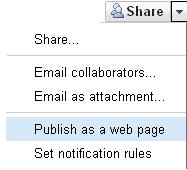
4.Share Publish as Web Page
publish Excel as a Web Page

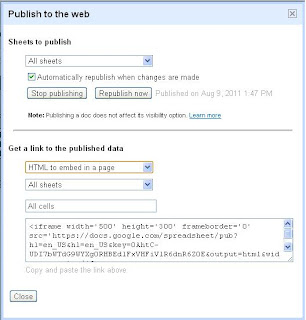
5.Select All sheets to publish all sheets in the web Page.
6.Select an HTML to Embed in a Page

Embed Excel as a Webpage

7.Copy the Iframe HTML from Textbox and paste in your Post choosing an Edit HTML option in blogger or in your website Page in Body Tag.
8.See now your Website and the page will have all contents of your excel file with tabs.

How to get Web Page Link -
If you do not need to embed the Excel in your website, still you can share the Excel web page link to others, for that choose web page option and get the link from text box, You can also get a link for a PDF, Txt, RSS, XLS and ODS.

Railway Portals - E-ticketing facility has been Temporarily Stopped

IRCTC site and IndianRailways.gov.in railway reservation websites are temporarily not allowing facility of e-ticketing as database maintenance and site maintenance going on both .It seems both won't work might be whole week and these will be down time to time for maintenance, in downtime message will be shown. IndianRailways.gov.in as expected to launch next week on 15, Aug 2011 completely.  

IRCTC is showing message currently

IRCTC down Site Message

IndianRailways.gov.in is showing message currently

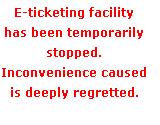
Down Site Message- Railway eTicketing

You can view the Train Details & Reservation status on www.erail.in and other websites, reservation will be possible from only reservation counter till both portal not gets up.

Current Updates (Aug 11, 2011) - IRCTC started working , still New portal showing "E-Ticketing facility has been temporarily stopped".

Correct Your Spelling, Grammar, Sentences in English

Good writing  and with good grammar always makes good effect and You just need to make sure whatever you are writing that is delivering to others or not, no single spelling mistake done so for.We have very good website polishmywriting.com which has power to correct your English writing and day by day you will improve your writing and way of writing.

One day will come when you need not this tool to check, whatever you had written, it has become automatically well written.So before posting any contents on your website, typing any mail to friend, or after creating a documents , please check your paragraphs, notes , contents through this Tool, it will help you a lot to write without any mistake.This tool gives a grammar suggestion also, try to  understand what says grammar, try to change your sentence so.